Note
Go to the end to download the full example code.
Three dimensional PGS through decision trees
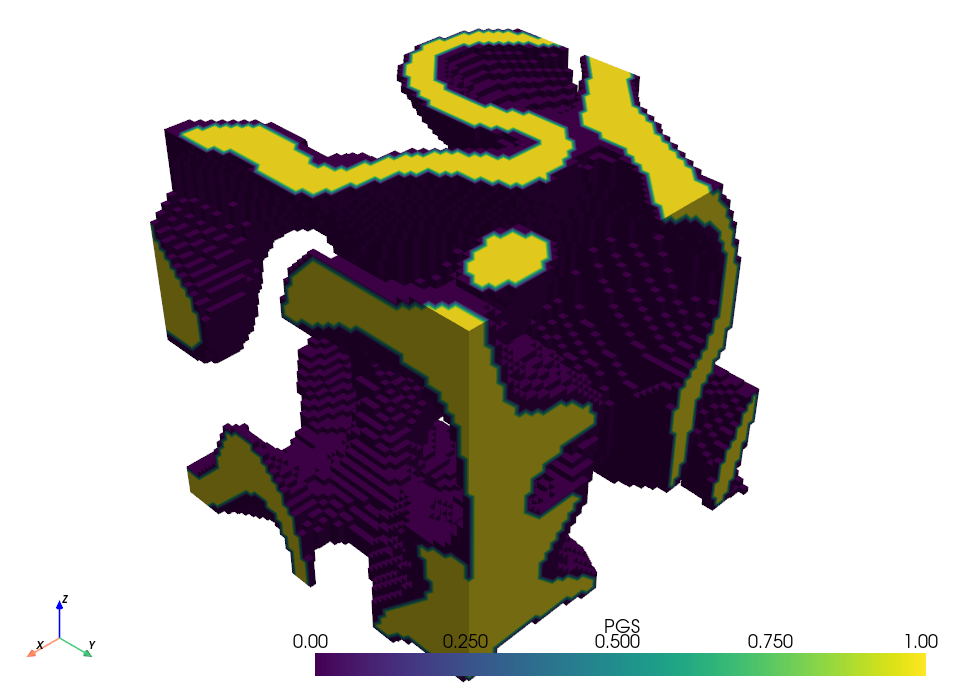
Let’s apply the decision tree approach to three dimensional PGS
As we want to generate a three dimensional field, we generate three spatial random fields (SRF) as our input. In this example, the number of fields is equal to the number of dimensions, but as before, this is not a requirement.
The decision tree will now utilise an ellipsoid as the decision boundary, having a similar structure as the ellipse in the previous example.
def ellipsoid(data, key1, key2, key3, c1, c2, c3, s1, s2, s3):
    return ((data[key1] - c1) / s1) ** 2 + ((data[key2] - c2) / s2) ** 2 + (
        (data[key3] - c3) / s3
    ) ** 2 <= 1


config = {
    "root": {
        "type": "decision",
        "func": ellipsoid,
        "args": {
            "key1": "Z1",
            "key2": "Z2",
            "key3": "Z3",
            "c1": 0,
            "c2": 0,
            "c3": 0,
            "s1": 3,
            "s2": 1,
            "s3": 0.4,
        },
        "yes_branch": "phase1",
        "no_branch": "phase0",
    },
    "phase0": {"type": "leaf", "action": 0},
    "phase1": {"type": "leaf", "action": 1},
}
As before, we initialise the PGS process, generate P, and plot to visualise the results
Total running time of the script: (0 minutes 20.640 seconds)